 By Monir Hossen
Written by the team at Google PPC Agency
Google ads for doctors can help your practice show up when people search for care near them. If you want more new patients but do not know where to start, this guide explains how it works, what to watch out for, and how to set it up step by step.
Why Google Ads Works for Medical Practices
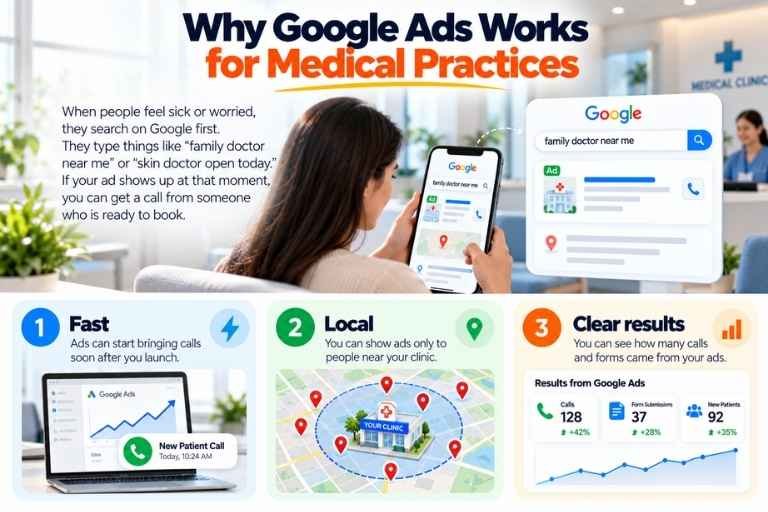
When people feel sick or worried, they search on Google first. They type things like “family doctor near me” or “skin doctor open today.” If your ad shows up at that moment, you can get a call from someone who is ready to book.
Here is what makes it useful:
- Fast: ads can start bringing calls soon after you launch.
- Local: you can show ads only to people near your clinic.
- Clear results: you can see how many calls and forms came from your ads.
How Google Ads Works
With ppc ads for doctors, you choose the words people search for and write a short ad. You pay only when someone clicks. You set a daily budget, so you always know the most you can spend.
Your ad then sends people to a page on your website. That page should make it easy to call you or book a visit.
What Makes Ads for Doctors Different
Ads for doctors are not like ads for shoes or hotels. Patients share private and sensitive problems, so trust matters a lot. A few things need extra care.
Patient privacy. Under HIPAA, you generally need written permission before you use a patient’s health information for marketing. Read the HHS guidance on HIPAA and marketing before you plan your campaign. If you are not sure, ask your lawyer.
Google’s health rules. Google limits how you can target people based on health topics. Read Google’s policy on health in personalized advertising so your ads are not rejected.
Honest claims. Do not promise cures or results. Keep your ads clear, calm, and true.
Google Ads for Physicians and Other Specialists
Google ads for physicians can work for many types of practices, such as family doctors, skin doctors, eye doctors, and clinics for children. Each specialty should have its own campaign and its own page. A person looking for a skin doctor wants to see a skin care page, not a general homepage.
Start with the service that brings you the most patients or the one you want to grow.
Local Service Ads for Medical Practices
Google also has Local Service Ads. These show your business at the top of search results, and you pay for leads instead of clicks. They are open only to some medical types, such as primary care and skin care. Check Google’s list of eligible services to see if your practice qualifies.
A Quick Note on the Name
You may still hear people say google adwords for doctors. Google Ads used to be called AdWords. It is the same tool, only with a newer name.
How Much Does It Cost?
The cost depends on your city, your specialty, and how many other clinics are bidding. Big cities usually cost more than small towns. Some specialties cost more than others.
Do not only look at the cost of each click. Look at how much you pay for each new patient who books. That number tells you if your ads are working, and it is the focus of our lead generation work.
How to Set Up Google Ads for Your Practice
Step 1: Pick one service
Start with one service and one location. A small, clear campaign works better than a big, messy one.
Step 2: Choose your search words
Pick words that show someone wants to book, such as “dermatologist near me” or “pediatrician accepting new patients.” Avoid broad words that only show curiosity.
Step 3: Add negative keywords
Block words like “free,” “jobs,” or “salary” so you do not pay for clicks that will never become patients. Google explains how negative keywords work in simple steps.
Step 4: Write a clear ad
Say what you treat, where you are, and how to book. Keep it short and honest.
Step 5: Use a focused page
Do not send people to your homepage. Send them to a page with one clear message, your phone number, a short form, and your hours. If your page is not turning visitors into calls, landing page optimization is often the quickest fix.
We recently ran Google Ads for a dentist in South Carolina who owns two dental clinics. We did not start with the ads. First, we improved the landing pages and added many of the things patients look for before they call. We also saw that the clinic websites had no clear reasons for a patient to choose them over another clinic, so we fixed that too. After the pages were ready, we moved on to the ad campaign, and the results were good. The lesson is simple: good ads need a good page to send people to.
Step 6: Track every call
Set up call tracking and form tracking. Without it, you cannot tell which ads bring patients.
Common Mistakes to Avoid
- Sending all clicks to the homepage
- Not blocking useless searches
- Using patient data in ads without permission
- Making big promises about results
- Letting calls go to voicemail
- Not checking results every week
Your front desk matters too. If nobody answers the phone, even great ads will waste money.
Should You Hire an Agency?
If you do not have time to manage ads every week, an agency can help. Look for one that:
- Has real experience with medical practices
- Explains where your money goes
- Reports on calls and booked visits, not just clicks
- Does not force you into a long contract
A team like Google PPC Agency can run the full account for you, from search words to tracking, and you can see how it works on our Google Ads management page. If you already have ads running, our PPC management service can review them and fix what is wasting money. Whoever you choose, ask for examples and clear reports before you sign.
Frequently Asked Questions
Are Google Ads worth it for doctors?
Yes, if you track calls and send people to a good page. They work best when your front desk answers fast.
How much should a medical practice spend?
Start with a small test budget. Watch how much you pay for each new patient, then grow what works.
Can I run Google Ads myself?
You can, but mistakes are easy and can be costly. Many practices start on their own and move to an agency later.
How long until I see results?
You can get clicks and calls in days. It often takes a few weeks of testing to improve your results.
Are there special rules for medical ads?
Yes. You must protect patient privacy and follow Google’s health rules. Your local medical rules may add more limits, so check them before you launch.
Final Thoughts
Google ads for doctors can bring in new patients when you pick the right words, use a clear page, and track every call. Start small, protect patient privacy, and improve step by step.
Want help with your campaign? Contact Google PPC Agency for a free consultation.