
 By Monir Hossen
Most people search on Google when they need a dentist. They type a problem like a toothache or a question like “who is the best dentist near me.” If your clinic shows up at the top at that moment, you get the call. That is the power of Google ads for dentists.
In this guide, I will explain how it works in simple words. You will learn the cost, the keywords to pick, how to set up your ads, and how to avoid common mistakes.
What Are Google Ads for Dentists?
Google ads for dentists are paid ads that show at the top of Google search results. You choose the words people search, and you pay only when someone clicks your ad. That is why it is called pay per click.
You may also hear people say Google Adwords. That is simply the old name for Google Ads. So when someone talks about Google Adwords for dentists or Adwords for dentists, they mean the same tool.
The best part is speed. A new website can take months to rank in normal search results. With dental Google ads, your clinic can show up in days.
Why Dental Google Ads Are Worth It
A new patient is worth a lot more than one click. A routine visit can lead to years of checkups, fillings, and other treatments. Bigger cases like implants can bring in $3,000 to $5,000 or more per case.
Ads also reach people at the right time. Someone searching for “emergency dentist” or “dental implants near me” is ready to book. This kind of lead generation is hard to match with flyers or social media posts, because the patient is already looking for help.
How Much Do Google Ads for Dental Practices Cost?
Dental is one of the more expensive industries on Google. According to WordStream data, dentists and dental services pay about $8.00 per click and about $72.97 per lead on Google Search in 2026. You can see the full numbers in this 2026 dental benchmark report from Web Tonic.
Your real cost will change based on your city, your competition, and the treatment you promote. A click for a basic cleaning costs much less than a click for implants. Keep in mind that a click is not a patient. What matters is how many clicks turn into phone calls and bookings. Another benchmark shows that dental ads often get conversion rates of 7 to 9 percent, which you can read in this Google ads for dentists guide from Stub Group.
Google Ads Targeting for Dentists
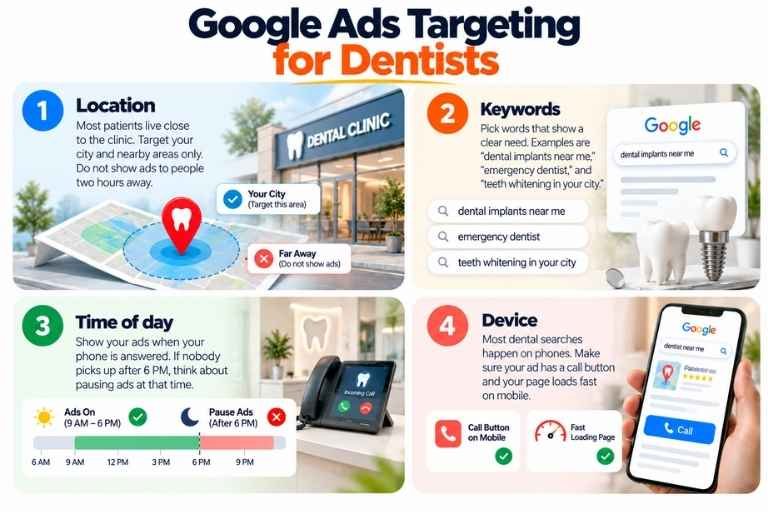
Good Google ads targeting for dentists keeps your money focused on people who can actually visit your clinic. Here are the main settings to get right.
1. Location. Most patients live close to the clinic. Target your city and nearby areas only. Do not show ads to people two hours away.
2. Keywords. Pick words that show a clear need. Examples are “dental implants near me,” “emergency dentist,” and “teeth whitening in your city.”
3. Time of day. Show your ads when your phone is answered. If nobody picks up after 6 PM, think about pausing ads at that time.
4. Device. Most dental searches happen on phones. Make sure your ad has a call button and your page loads fast on mobile.
How to Choose the Right Keywords
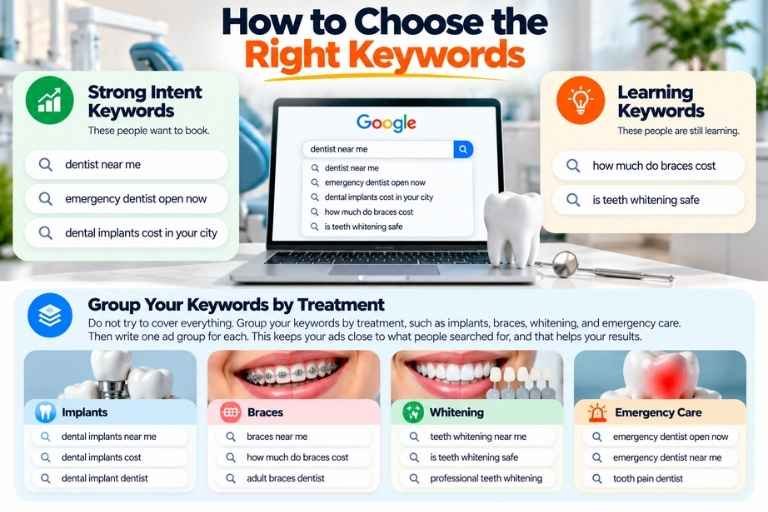
Start with keywords that show strong intent. These people want to book. Then add a few keywords that show someone is still learning.
Strong intent keywords:
- dentist near me
- emergency dentist open now
- dental implants cost in your city
Learning keywords:
- how much do braces cost
- is teeth whitening safe
Do not try to cover everything. Group your keywords by treatment, such as implants, braces, whitening, and emergency care. Then write one ad group for each. This keeps your ads close to what people searched for, and that helps your results.
Use Negative Keywords to Save Money
Not every click is a good click. Some people search for dental jobs or dental school. They will never become patients, but you still pay when they click.
Negative keywords fix this. Google explains that negative keywords let you exclude search terms from your campaigns so you focus on the keywords that matter to your customers. You can read the full details on the Google Ads Help page about negative keywords.
Good negative keywords for a dental clinic include “jobs,” “salary,” “school,” “course,” and “free.” Do not add too many, though. Google warns that too many negative keywords can make your ads reach fewer customers.
Write Ads That People Want to Click
Your ad is only a few lines, so every word counts. Keep it clear and kind. Tell people what you offer and what to do next.
A good ad includes:
- The treatment they searched for
- Your city or area
- One clear benefit, like same day visits or weekend hours
- A simple action, like “Call now” or “Book online”
Avoid vague lines like “quality dental care.” Almost every clinic says that. Be specific instead. “Emergency dentist open today in your city” is much stronger.
Build a Landing Page That Matches Your Ad
Many dentists lose patients after the click. Someone clicks an ad about implants and lands on a home page full of other services. They get confused and leave.
Send each ad to a page that matches the ad. If the ad is about whitening, the page should be about whitening. Show your phone number, a booking button, patient reviews, and your address near the top. Good landing page optimization can turn more of your visitors into booked patients without spending more on ads.
This also helps your Quality Score. Google says that Quality Score is based on three parts: expected click rate, ad relevance, and landing page experience. A better score can help you get better ad positions at a lower cost. Google also gives this advice in its guide on 5 ways to use Quality Score to improve your performance: keep the message consistent from your ad to your landing page.
Track Your Results
If you do not track calls and bookings, you are guessing. Set up call tracking and form tracking so you know which ads bring real patients.
Check these numbers every month:
- How many calls and bookings you got
- How much you paid for each new patient
- Which keywords brought the best patients
- Which search terms wasted money
Cut what does not work and put more budget into what does. Small changes made often give better results than big changes made once.
Should You Hire Someone for Google Ads Management for Dentists?
You can run ads yourself, but it takes time. Many clinic owners are busy treating patients and do not have hours to study bids and reports.
This is where Google ads management for dentists helps. A good Google ads agency for dentists knows which keywords to target, how to write dental ads, and how to track patient bookings. If you search for a dental Google Adwords agency, ask for real examples from other clinics. Also ask how they report results. You should always understand where your money is going.
If you want a team that handles the full process, a Google PPC Agency can set up your campaigns, watch them every week, and keep improving them. Strong PPC management means someone is always checking your keywords, your budget, and your results, so your money is not wasted.
Common Mistakes to Avoid
- Using broad keywords with no negative keywords
- Sending all ads to the home page
- Not tracking phone calls
- Targeting a very large area
- Letting calls go unanswered
The last one is more common than you think. Your ads can be perfect, but if your front desk does not answer, the patient will call the next clinic.
Final Thoughts
Google ads for dentists can be one of the fastest ways to fill your appointment book. Start small, target your local area, use negative keywords, and send people to a page that matches your ad. Track every call and booking, and improve step by step.
If you want more simple tips like these, read more on our blog. And if you are ready to get more patients from Google, contact us today and we will help you plan your first campaign.